 Sales Navigator
 PhantomBuster
Run my business › Hot leads on autopilot
Find hot leads on LinkedIn 24/7
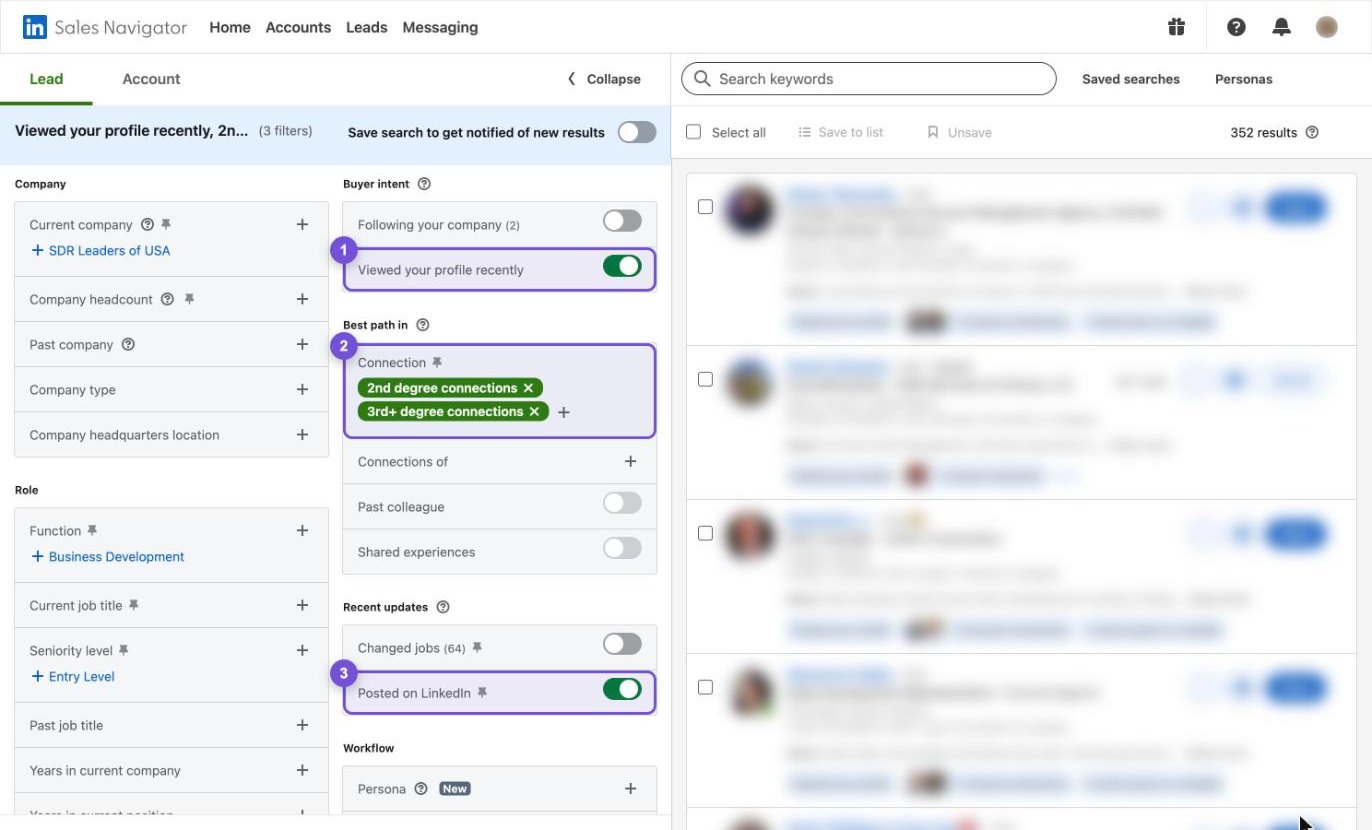
Sales Nav: add the Viewed your profile recently filter, plus 2nd and 3rd degree connections, plus Posted on LinkedIn.
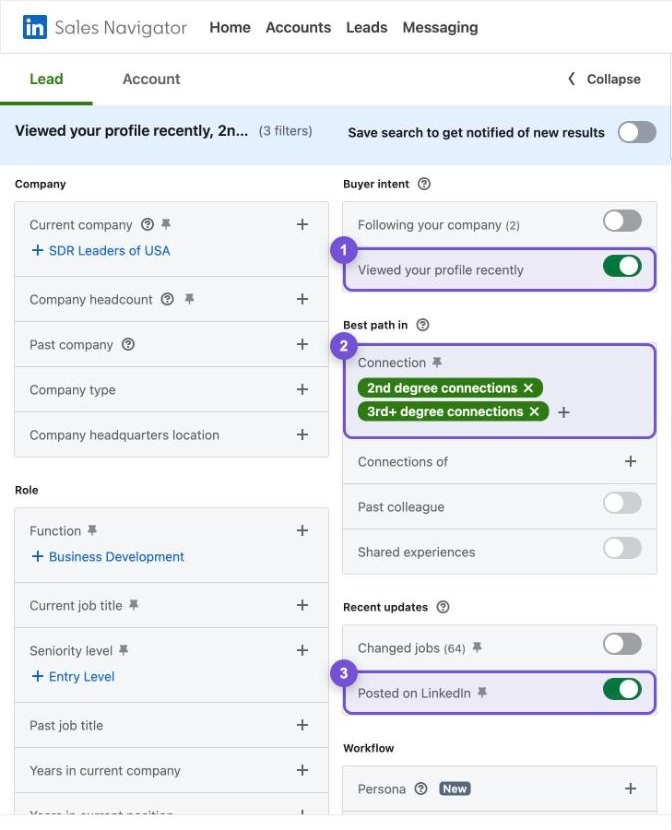
Too few people? Turn Viewed your profile recently off and keep the other two. Add your job titles and area so the list stays tight. Then save the search.
PhantomBuster: scrape that list. Copy your saved search link and paste it into PhantomBuster's Sales Navigator search export. Set it to run every day, so new hot leads come in 24/7. Want the safest way? Let Claude in Chrome read the page instead.
AI that list: download the list from PhantomBuster and paste it into Claude with the prompt below. It deeply qualifies or disqualifies every company against your offer.
Call em: reach out on the phone, InMail them, email them. Do whatever you need to. Start with the best fits.
 Claude
I want to: Find hot leads on LinkedIn 24/7. Sales Navigator finds people who just looked at your profile and are active on LinkedIn. PhantomBuster scrapes that list every day. AI qualifies or disqualifies every company against your offer. Then you call them. I'm still learning this, so be my coach, not just my helper. HOW TO WORK WITH ME 1. Before you start, ask me for everything in [brackets] below. Ask one question at a time and wait for my answer. 2. If I don't know an answer, give me an example and help me pick. 3. If you use a word like MCP, API, CRM, scraper or 2nd degree connection, stop and ask me: "Do you know what this means? Want me to explain it?" 4. Before each step, tell me in one line what it does and why it matters. 5. Go one step at a time. Wait for me to say "done" before the next step. If I'm stuck, tell me exactly where to click. 6. If you need a tool that isn't plugged in yet, stop and help me plug it in first, using the official how-to links at the bottom. HOW I DO IT (follow these steps, in this order) 1. Sales Nav: add the Viewed your profile recently filter, plus 2nd and 3rd degree connections, plus Posted on LinkedIn. 2. Too few people? Turn Viewed your profile recently off and keep the other two. Add your job titles and area so the list stays tight. Then save the search. 3. PhantomBuster: scrape that list. Copy your saved search link and paste it into PhantomBuster's Sales Navigator search export. Set it to run every day, so new hot leads come in 24/7. Want the safest way? Let Claude in Chrome read the page instead. 4. AI that list: download the list from PhantomBuster and paste it into Claude with the prompt below. It deeply qualifies or disqualifies every company against your offer. 5. Call em: reach out on the phone, InMail them, email them. Do whatever you need to. Start with the best fits. THE 3 WAYS TO GET THE LIST INTO AI (ask me which one I want) - 24/7: PhantomBuster scrapes it every day. Paste your saved search link into PhantomBuster's Sales Navigator search export. Run it once a day, slowly, so LinkedIn stays happy. - Safest: Claude reads it in your browser. Open your search in Chrome and ask Claude in Chrome to read the page. You stay signed in, it only reads, and you watch it work. - Hands off: Grok Bot does it on its own computer. Grok Bot opens Sales Navigator on its own computer every morning and copies the new people. It has to be signed in to your LinkedIn there, so only use it if you're OK with that. YOUR JOB You are my sales researcher. I'm giving you a list of people from my Sales Navigator search, scraped with PhantomBuster. My list: [paste the list or upload the file] What I sell: [your offer, in one line] Who it's for: [industry, company size, area] Who it's NOT for: [who you turn away] What a new customer is worth: [your average deal size] Do this for every company on the list: 1. Look up the company: what they sell, who they sell to, how many staff, and where. Use their website and LinkedIn. 2. Score their fit with my offer from 1 to 10, and say why in one line. 3. Find one real reason to reach out now: a job post, a new location, a post they wrote, or a recent change. 4. Mark each one QUALIFIED, MAYBE or DISQUALIFIED. Disqualify competitors, suppliers, students, recruiters and companies that are too small. Rules: - Only use facts you can link to. - Never make anything up. If you can't find it, say so. - If you can't find enough, mark it MAYBE and say what's missing. Give me a table, best first: name, title, company, website, fit score, reason to reach out now, verdict, and the link that proves the reason. Then write a one-line call opener for each of the top 10. WHEN WE'RE DONE - Check with me that this is true: You have a qualified list of hot leads, new ones come in every day, and you know who to call first. - Sum up what we did in 3 short lines. - Ask me 2 quick questions so I remember how to do it next time. - Tell me what to do next. OFFICIAL HOW-TO LINKS - Learn LinkedIn Sales Navigator in 5 minutes: https://business.linkedin.com/sell/sales-navigator/how-to-prospect - Find your hottest leads: people who viewed your profile: https://scommunity.linkedin.com/learn-explore-apply-68/how-to-turn-profile-viewers-into-clients-with-the-viewed-your-profile-recently-feature-5849 - Automate outbound lead gen 24/7 with PhantomBuster: https://phantombuster.com/automations/sales-navigator/6988/sales-navigator-search-export/tutorial - Qualify every lead with AI using Claude in Chrome: https://support.claude.com/en/articles/12012173-get-started-with-claude-in-chrome - PhantomBuster (MCP): https://hub.phantombuster.com/docs/mcp-server - PhantomBuster (App): https://phantombuster.com/automations/linkedin/2818/linkedin-auto-connect - Claude (MCP): https://support.claude.com/en/articles/11175166-get-started-with-custom-connectors-using-remote-mcp